Click Here for the “Step
By Step: Configuring 11g R2 RAC to RAC Dataguard (3-node RAC Primary to 2-Node
RAC standby)”
Step By Step process
of Configuring Oracle 10gR2 (10.2.0.3) RAC Standby for RAC Primary using ASM:
By
Bhavin Hingu
This
document explains the step by step process of building 10g R2 (10.2.0.3)
Physical RAC Dataguard for RAC Primary Database. It also covers the steps of
converting PHYSICAL Standby Database into LOGICAL standby Database and at the
end it shows the process of configuring the DataGuard Broker.
The Step By Step configuration of Single Instance 10g Standby for single
Instance 10g Primary is located HERE.
Task List:
·
Verifying
Physical Standby DB:
Technical
Architecture of 10G RAC primary to RAC DataGuard
PRIMARY
      db
name: TSTP (7 Node RAC)
      inst
name(s): TSTP1,TSTP2,TSTP3,TSTP4,TSTP5,TSTP6,TSTP7
db_unique_name: tstp
Listener: LISTENER
port: 51521
Service Name: TSTP_SRV
      TNS
Alias: TSTP
ORACLE_HOME=/u13/app/oracle/product/10g
Storage Type: ASM, Disk Groups: FLASH,DATA
File Type: OMF and located under +FLASH/tstp and +DATA/tstp
DB Version: 10.2.0.3
      OS:
RHEL 4 (64 bit)
STANDBY
      DB
Name: TSTP (single Node RAC) --> TSTSB after getting converted into logical
standby
inst name(s): TSTSB1
db_unique_name: tstsb
Listener: LISTENER
port: 51521
Service Name: TSTSB_SRV
      TNS
ALIAS: TSTSB
ORACLE_HOME=/u13/app/oracle/product/10g
Storage Type: ASM, Disk Groups: FLASH,DATA
      File Type: OMF and
located under +FLASH/tstsb and +DATA/tstsb
      DB
Version: 10.2.0.3
      OS:
RHEL 4 (64 bit)
ASSUMPTION:
Primary:
·
The RAC Primary
Database is in fully operating condition in Archivelog mode.
·
The Primary Database
is using ASM as Storage and OMFs.
·
Listener LISTENER
has already been created.
·
Database and its
Instances are all registered into the OCR sucessfully.
·
Service TSTP_SRV is
created with all the 7 Instances as the preferred Instances.
Standby:
·
Clusterware as well
as RAC RDBMS has already been Installed on Single Node.
·
ASM has already been
configured with DATA and FLASH Disk Groups created.
·
Listener LISTENER
has already been created.
Create
RAC Physical Standby For RAC Primary
At Very high level,
Creating RAC Standby Dataguard Requires to Prepare Primary site, Standby site
for the DataGuard Configuration. Once these sites are properly configured, then
it’s a matter of restoring the Standby Database from Primary backup and
performing few Post Creation steps.
Prepare
PRIMARY site:
Tasks:
- Enable
Force Logging.
- Update
listener.ora file to include SID information on each node in cluster.
- Verify
cluster Service TSTP_SRV is available.
- Verify
TNSNAMES.ORA file.
- Modify
init.ora Parameters For DataGuard Configuration.
- Create
the Standby Redo logs.
- Create
temporary directory to hold the RMAN backup of this database.
- Backup
the Primary Database for Standby.
Enable Force logging
alter database force logging;
Edit the Listener.ora file with SID
information on EACH NODE:
Create Listener called LISTENER if one does not exists. If listener is existed
on the PRIMARY RAC, then make sure that the SID information is existed in the
SID_LIST_<listener_name>_HOSTNAME section into the listener.ora file for all
the NODES in CLUSTER to support Dataguard broker Configuration. If SID
information is not there, then add them as shown below.
Before:
LISTENER_DCLNDRATDB01
=
(DESCRIPTION_LIST =
(DESCRIPTION =
(ADDRESS = (PROTOCOL = TCP)(HOST = dclndratdb01-vip)(PORT
= 51521)(IP = FIRST))
(ADDRESS = (PROTOCOL = TCP)(HOST =
10.6.5.60)(PORT = 51521)(IP = FIRST))
)
)
After:
LISTENER_DCLNDRATDB01
=
(DESCRIPTION_LIST =
(DESCRIPTION =
(ADDRESS = (PROTOCOL = TCP)(HOST =
dclndratdb01-vip)(PORT = 51521)(IP = FIRST))
(ADDRESS = (PROTOCOL = TCP)(HOST =
10.6.5.60)(PORT = 51521)(IP = FIRST))
)
)
SID_LIST_LISTENER_DCLNDRATDB01 =
(SID_LIST =
(SID_DESC =
(GLOBAL_DBNAME = tstp_DGMGRL) # <--
dbname.<db_domain>_DGMGRL
(ORACLE_HOME = /u13/app/oracle/product/10g)
(SID_NAME = tstp1)
)
)
Reload the listener on this node after modifying the listener.ora file.
lsnrctl
reload LISTENER_DCLNDRATDB01
Repeat the above process for all the nodes in Cluster. Verify that the
LISTENER on all the nodes is registered with the TSTP_SRV service name. If not
available, then create it using dbca.
Once the dbca creates the TSTP_SRV service, then verify that it is registered
and available.
srvctl config service
-d tstp
Verify TNSNAMES.ORA:
Make Sure that...
(1) Primary Database's Connect Identifier (Alias) is Defined.
(2) Aliases for LOCAL_LISTENER and REMOTE_LISTER are defined. (If
non-standard port is used i.e, other than 1521 which is in my case.)
(3) SAME COPY of tnsnames.ora is existed on all the nodes in RAC.
#
Primary Database's Instances
# ============================
TSTP7 =
(DESCRIPTION =
(ADDRESS = (PROTOCOL = TCP)(HOST = dclndratdb07-vip)(PORT =
51521))
(CONNECT_DATA =
(SERVER = DEDICATED)
(SERVICE_NAME = tstp)
(INSTANCE_NAME = tstp7)
)
)
TSTP6 =
(DESCRIPTION =
(ADDRESS = (PROTOCOL = TCP)(HOST = dclndratdb06-vip)(PORT =
51521))
(CONNECT_DATA =
(SERVER = DEDICATED)
(SERVICE_NAME = tstp)
(INSTANCE_NAME = tstp6)
)
)
TSTP5 =
(DESCRIPTION =
(ADDRESS = (PROTOCOL = TCP)(HOST = dclndratdb05-vip)(PORT =
51521))
(CONNECT_DATA =
(SERVER = DEDICATED)
(SERVICE_NAME = tstp)
(INSTANCE_NAME = tstp5)
)
)
TSTP4 =
(DESCRIPTION =
(ADDRESS = (PROTOCOL = TCP)(HOST = dclndratdb04-vip)(PORT =
51521))
(CONNECT_DATA =
(SERVER = DEDICATED)
(SERVICE_NAME = tstp)
(INSTANCE_NAME = tstp4)
)
)
TSTP3 =
(DESCRIPTION =
(ADDRESS = (PROTOCOL = TCP)(HOST = dclndratdb03-vip)(PORT =
51521))
(CONNECT_DATA =
(SERVER = DEDICATED)
(SERVICE_NAME = tstp)
(INSTANCE_NAME = tstp3)
)
)
TSTP2 =
(DESCRIPTION =
(ADDRESS = (PROTOCOL = TCP)(HOST = dclndratdb02-vip)(PORT =
51521))
(CONNECT_DATA =
(SERVER = DEDICATED)
(SERVICE_NAME = tstp)
(INSTANCE_NAME = tstp2)
)
)
TSTP1 =
(DESCRIPTION =
(ADDRESS = (PROTOCOL = TCP)(HOST = dclndratdb01-vip)(PORT =
51521))
(CONNECT_DATA =
(SERVER = DEDICATED)
(SERVICE_NAME = tstp)
(INSTANCE_NAME = tstp1)
)
)
# REMOTE_LISTENER ALIAS
# ======================
LISTENERS_TSTP =
(ADDRESS_LIST =
(ADDRESS = (PROTOCOL = TCP)(HOST = dclndratdb01-vip)(PORT =
51521))
(ADDRESS = (PROTOCOL = TCP)(HOST = dclndratdb02-vip)(PORT =
51521))
(ADDRESS = (PROTOCOL = TCP)(HOST = dclndratdb03-vip)(PORT =
51521))
(ADDRESS = (PROTOCOL = TCP)(HOST = dclndratdb04-vip)(PORT =
51521))
(ADDRESS = (PROTOCOL = TCP)(HOST = dclndratdb05-vip)(PORT =
51521))
(ADDRESS = (PROTOCOL = TCP)(HOST = dclndratdb06-vip)(PORT =
51521))
(ADDRESS = (PROTOCOL = TCP)(HOST = dclndratdb07-vip)(PORT =
51521))
)
# PRIMARY DB's Connect Identifier using TSTP_SRV service
# ======================================================
#TSTP_SRV =
TSTP =
(DESCRIPTION =
(ADDRESS = (PROTOCOL = TCP)(HOST = dclndratdb01-vip)(PORT =
51521))
(ADDRESS = (PROTOCOL = TCP)(HOST = dclndratdb02-vip)(PORT =
51521))
(ADDRESS = (PROTOCOL = TCP)(HOST = dclndratdb03-vip)(PORT =
51521))
(ADDRESS = (PROTOCOL = TCP)(HOST = dclndratdb04-vip)(PORT =
51521))
(ADDRESS = (PROTOCOL = TCP)(HOST = dclndratdb05-vip)(PORT =
51521))
(ADDRESS = (PROTOCOL = TCP)(HOST = dclndratdb06-vip)(PORT =
51521))
(ADDRESS = (PROTOCOL = TCP)(HOST = dclndratdb07-vip)(PORT =
51521))
(LOAD_BALANCE = yes)
(CONNECT_DATA =
(SERVER = DEDICATED)
(SERVICE_NAME = tstp_srv)
(FAILOVER_MODE =
(TYPE = SELECT)
(METHOD = BASIC)
(RETRIES = 180)
(DELAY = 5)
)
)
)
# LOCAL_LISTENER Aliases for EACH NODE.
# ====================================
LISTENER_TSTP7 =
(ADDRESS = (PROTOCOL = TCP)(HOST = dclndratdb07-vip)(PORT = 51521))
LISTENER_TSTP6 =
(ADDRESS = (PROTOCOL = TCP)(HOST = dclndratdb06-vip)(PORT = 51521))
LISTENER_TSTP5 =
(ADDRESS = (PROTOCOL = TCP)(HOST = dclndratdb05-vip)(PORT = 51521))
LISTENER_TSTP4 =
(ADDRESS = (PROTOCOL = TCP)(HOST = dclndratdb04-vip)(PORT = 51521))
LISTENER_TSTP3 =
(ADDRESS = (PROTOCOL = TCP)(HOST = dclndratdb03-vip)(PORT = 51521))
LISTENER_TSTP2 =
(ADDRESS = (PROTOCOL = TCP)(HOST = dclndratdb02-vip)(PORT = 51521))
LISTENER_TSTP1 =
(ADDRESS = (PROTOCOL = TCP)(HOST = dclndratdb01-vip)(PORT = 51521))
Modify init.ora parameter for Dataguard Configuration:
The Parameters HILIGHTED below are added to support the DataGuard to support
both the modes. As you may notice here, we use TSTSB Aliases for Standby
Database, But we do not have it defined into the TNSNAMES.ORA file yet. We will
add it into the tnsnames.ora file after we create the SERVICE on the STANDBY
Cluster.
(1) Create parameter file from the modified spfile for the STANDBY Database.
DataGuard related Parameters on Primary:
Update
the SPFILE using ALTER SYSTEM command on PRIMARY or stop the database and
recreate the spfile to reflect the above changes.
alter
system set
log_file_name_convert='+FLASH/tstsb,'+FLASH/tstp','+DATA/tstsb','+DATA/tstp'
scope=spfile sid='*';
alter system set db_file_name_convert='+DATA/tstsb','+DATA/tstp' scope=spfile
sid='*';
alter system set
dg_broker_config_file1='+DATA/TSTP/dgbroker/dg_config_file1.dat' sid='*';
alter system set
dg_broker_config_file2='+FLASH/TSTP/dgbroker/dg_config_file2.dat' sid='*';
alter system set dg_broker_start=FALSE sid='*';
alter system set fal_client='TSTP1' sid='tstp1';
alter system set fal_client='TSTP2' sid='tstp2';
alter system set fal_client='TSTP3' sid='tstp3';
alter system set fal_client='TSTP4' sid='tstp4';
alter system set fal_client='TSTP5' sid='tstp5';
alter system set fal_client='TSTP6' sid='tstp6';
alter system set fal_client='TSTP7' sid='tstp7';
alter system set fal_server='TSTSB' sid='*';
alter system set local_listener='LISTENER_TSTP1' sid='tstp1';
alter system set local_listener='LISTENER_TSTP2' sid='tstp2';
alter system set local_listener='LISTENER_TSTP3' sid='tstp3';
alter system set local_listener='LISTENER_TSTP4' sid='tstp4';
alter system set local_listener='LISTENER_TSTP5' sid='tstp5';
alter system set local_listener='LISTENER_TSTP6' sid='tstp6';
alter system set local_listener='LISTENER_TSTP7' sid='tstp7';
alter system set remote_listener='LISTENERS_TSTP' sid='*';
alter system set log_archive_config='dg_config=(tstp,tstsb)' sid='*';
alter system set log_archive_dest_1='LOCATION=USE_DB_RECOVERY_FILE_DEST
VALID_FOR=(ONLINE_LOGFILES,ALL_ROLES) DB_UNIQUE_NAME=TSTP' sid='*';
alter system set log_archive_dest_state_2='defer' sid='*';
alter system set log_archive_dest_2='SERVICE=tstsb LGWR ASYNC
VALID_FOR=(ONLINE_LOGFILES,PRIMARY_ROLE) DB_UNIQUE_NAME=tstsb' sid='*';
alter system set log_archive_dest_3='LOCATION=+FLASH/TSTP/STANDBYLOG
VALID_FOR=(STANDBY_LOGFILES,STANDBY_ROLE) DB_UNIQUE_NAME=TSTP' sid='*';
alter system set log_archive_dest_state_1='enable' sid='*';
alter system set log_archive_dest_state_3='enable' sid='*';
alter system set log_archive_max_processes=7 sid='*';
alter system set log_archive_min_succeed_dest=2 sid='*';
alter system set remote_listener='LISTENERS_TSTP' sid='*';
alter system set remote_login_passwordfile='EXCLUSIVE' sid='*';
alter system set service_names='TSTP','TSTP_SRV' sid='*';
alter system set standby_archive_dest='+FLASH/TSTP/STANDBYLOG' sid='*';
alter system set standby_file_management='auto' sid='*';
Create
the Parameter file:
create
pfile='$ORACLE_HOME/dbs/inittstp.ora' from spfile;
Create the STANDBY Redo Logs (SRLs)
We should have minimum of (No. Of threads)*(groups per Threads + 1). We have
total 7 Threads and each has 2 groups. So, We need 3 standby Redo Logs per
Thread at Minimum.
Get
the Max Group# from v$log.
SQL>
select thread#, group# from v$log order by 1,2;
THREAD#
GROUP#
---------- ----------
1 1
1 2
2 3
2 4
3 5
3 6
4 7
4 8
5 9
5 10
6 11
THREAD# GROUP#
---------- ----------
6 12
7 13
7 14
14 rows selected.
Let’s
start with the Group No. of 15
to add the Standby Redo Logs because the Last Online Redo Group# is 14.
alter system set standby_file_management=manual sid='*';
alter database add standby logfile thread 1
group 15 size 52M,
group 16 size 52M,
group 17 size 52M;
alter database add standby logfile thread 2
group 18 size 52M,
group 19 size 52M,
group 20 size 52M;
alter database add standby logfile thread 3
group 21 size 52M,
group 22 size 52M,
group 23 size 52M;
alter database add standby logfile thread 4
group 24 size 52M,
group 25 size 52M,
group 26 size 52M;
alter database add standby logfile thread 5
group 27 size 52M,
group 28 size 52M,
group 29 size 52M;
alter database add standby logfile thread 6
group 30 size 52M,
group 31 size 52M,
group 32 size 52M;
alter database add standby logfile thread 7
group 33 size 52M,
group 34 size 52M,
group 35 size 52M;
alter system set standby_file_management=auto sid='*';
Create Directory For RMAN Backup
Create the Directory to hold the RMAN backup. This step is not necessary if
using tape backup.
dclndratdb01:>mkdir
/home/oracle/backup
Verify the Archivelog Mode:
archive log list
If the Database is not in archive log mode, then enable the Archivelog. The
primary database has to be in Archivelog mode to configure the DataGuard.
Backup The Primary Database For
Standby.
Take the backup of the primary database and the standby controlfile.
rman target /
nocatalog
run
{
sql "alter system switch logfile";
allocate channel ch1 type disk format
'/home/oracle/backup/Primary_bkp_for_stndby_%U';
backup database;
backup current controlfile for standby;
sql "alter system archive log current";
}
TASKS:
- Create
Staging Directory.
- Copy the
rman backup from PRIMARY server to STANDBY server under this directory.
- Copy the
inittstp.ora from $ORACLE_HOME/dbs ON PRIMARY into the $ORACLE_HOME/dbs
directory on STANDBY server.
- Create
password file and Create required Directories for the standby database
- Create
the required Directories in ASM Disk Groups for the Standby DB.
- Modify
the pfile to reflect the Standby Parameters and create spfile from this
pfile.
Create temporary Staging Directory.
Create the directory identical to the one created on Primary to hold RMAN
Backup (i.e /home/oracle/backup in our case). This is not required in case the
backup of Primary DB is on tape.
[oracle]$ pwd
/home/oracle
[oracle]$ mkdir backup
Copy the RMAN Backup files and init.ora from PRIMARY
scp dclndratdb01:/home/oracle/backup/*
backup
scp dclndratdb01:$ORACLE_HOME/dbs/inittstp.ora $ORACLE_HOME/dbs/inittstsb.ora
Copy the Password File and
init.ora file from PRIMARY: (ON ALL THE NODES IN RAC)
Copy
the Password file and init.ora file (inittstp.ora) residing under the
$ORACLE_HOME/dbs/orapwTSTP1 to the standby node under $ORACLE_HOME/dbs
directory with the name of orapwtstsb1 and inittstsb1.ora for password file and
parameter file respectively.
Create required Directories under
$ORACLE_BASE:
cd $ORACLE_BASE/admin
mkdir tstsb
cd tstsb
mkdir bdump cdump udump pfile create scripts
Create required Directories in ASM Disk Groups:
I
am using +DATA and +FLASH diskgroups to store the Database files. It is not
required to create all of the mentioned Directly. But I have faced a problem if
the LOG_ARCHIVE_DEST and STANDBY_ARCHIVE_DEST directories are not existed into
the Diskgroups
[oracle]$ export
ORACLE_SID=+ASM1
[oracle]$ export ORACLE_HOME=/u13/app/oracle/product/asm
[oracle]$ asmcmd
ASMCMD> lsdg
State Type Rebal Unbal
Sector Block AU Total_MB
Free_MB Req_mir_free_MB Usable_file_MB Offline_disks
Name
MOUNTED EXTERN N
N 512 4096
1048576 823953
430321
0
430321
0 DATA/
MOUNTED EXTERN N
N 512 4096
1048576 126762
126709
0
126709
0 DATA2/
MOUNTED EXTERN N
N 512 4096
1048576 394342
112542
0
112542
0 FLASH/
ASMCMD> cd data
ASMCMD> mkdir TSTSB
ASMCMD> cd tstsb
ASMCMD> mkdir PARAMETERFILE
ASMCMD> mkdir DATAFILE
ASMCMD> mkdir TEMPFILE
ASMCMD> mkdir ARCHIVELOG
ASMCMD> mkdir CONTROLFILE
ASMCMD> mkdir ONLINELOG
ASMCMD> mkdir STANDBYLOG
ASMCMD> mkdir dgbroker
ASMCMD> pwd
+data/tstsb
ASMCMD> ls
PARAMETERFILE/
DATAFILE/
TEMPFILE/
ARCHIVELOG/
CONTROLFILE/
ONLINELOG/
STANDBYLOG/
dgbroker/
Create the Same Directory structure under the FLASH diskgroup.
Modify init.ora file ($ORACLE_HOME/dbs/inittstsb1.ora):
Add/Modify the below parameters into the Standby init.ora file to support both
the modes of Dataguard for Standby Database.
(1) Modify/Add the HIGHLIGHTED parameters shown below into the
$ORACLE_HOME/dbs/inittstsb.ora file.
(2) Create spfile from the modified pfile.
(3) Create $ORACLE_HOME/dbs/initttstsb<n>.ora file on each node to point
to the spfile. <n> stands for instance number.
Only Dataguard related parameters are shown here.
*.db_unique_name='TSTSB'
*.log_file_name_convert='+FLASH/tstp,'+FLASH/tstsb','+DATA/tstp','+DATA/tstsb'
*.db_file_name_convert='+DATA/tstp','+DATA/tstsb'
*.dg_broker_config_file1='+DATA/TSTSB/dgbroker/dg_config_file1.dat'
*.dg_broker_config_file2='+FLASH/TSTSB/dgbroker/dg_config_file2.dat'
*.dg_broker_start=FALSE
tstsb1.fal_client='TSTSB1'
*.fal_server='TSTP'
tstsb1.local_listener='LISTENER_TSTSB1'
*.remote_listener='LISTENERS_TSTSB'
*.log_archive_config='dg_config=(tstp,tstsb)'
*.log_archive_dest_1='LOCATION=USE_DB_RECOVERY_FILE_DEST
VALID_FOR=(ONLINE_LOGFILES,ALL_ROLES) DB_UNIQUE_NAME=TSTSB'
*.log_archive_dest_2='SERVICE=TSTP LGWR ASYNC
VALID_FOR=(ONLINE_LOGFILES,PRIMARY_ROLE) DB_UNIQUE_NAME=TSTP'
*.log_archive_dest_3='LOCATION=+FLASH/TSTSB/STANDBYLOG
VALID_FOR=(STANDBY_LOGFILES,STANDBY_ROLE) DB_UNIQUE_NAME=TSTSB'
*.log_archive_dest_state_1='enable'
*.log_archive_dest_state_2='defer'
*.log_archive_dest_state_3='enable'
*.log_archive_max_processes=7
*.log_archive_min_succeed_dest=2
*.remote_listener='LISTENERS_TSTSB'
*.remote_login_passwordfile='EXCLUSIVE'
*.service_names='TSTSB','TSTSB_SRV'
*.standby_archive_dest='+FLASH/TSTSB/STANDBYLOG'
*.standby_file_management='auto'
Create spfile and inittstsb1.ora file that points to the SPFILE.
SQL> !cat inittstsb1.ora
SPFILE='+DATA/tstsb/PARAMETERFILE/spfiletstsb.ora'
SQL> create spfile='+DATA/tstsb/PARAMETERFILE/spfiletstsb.ora' from
pfile='/u13/app/oracle/product/10g/dbs/inittstsb.ora'
2 ;
File created.
SQL> exit
TASKS
- Set the
Environment Variable and start the Instance in NOMOUNT.
- Connect
to the RMAN to restore the standby database.
- Get the
Name of the controlfile.
- Modify
the CONTROL_FILES parameter to reflect the above name in spfile.
- Bounce
The Instance to the Mount State.
- Create
the Online Redo logs (if not available) and Standby redo logs.
- Confirm
the Status of Standby database
- Register
the New Standby database to the OCR.
- Modify
listener.ora file to add SID Information.
- Create
the TSTSB_SRV service for the Standby Database.
- Modify
the TNSNAMES.ORA
Set the Environment Variable and Start the Instance
in NOMOUNT:
[oracle]$ export ORACLE_BASE=/u13/app/oracle
[oracle]$ export ORACLE_HOME=/u13/app/oracle/product/10g
[oracle]$ export ORACLE_SID=tstsb1
[oracle]$ cd $ORACLE_HOME/dbs
[oracle]$ sqlplus / as sysdba
[oracle]$ sqlplus / as sysdba
SQL*Plus: Release 10.2.0.3.0 - Production on Wed Oct 10 13:59:24 2007
Copyright (c) 1982, 2006, Oracle. All Rights Reserved.
Connected to an idle instance.
SQL> startup
nomount
ORACLE instance started.
Total System Global Area 1.0486E+10 bytes
Fixed Size
2090112 bytes
Variable Size
2365590400 bytes
Database Buffers 8103395328
bytes
Redo
Buffers
14684160 bytes
Restore Standby Database
[oracle]$ rman target
sys/<sys_password>@TSTP1 auxiliary /
{
allocate channel ch1 device type disk;
allocate auxiliary channel aux_1 device type disk;
duplicate target database for standby dorecover;
release channel ch1;
release channel aux_1;
}
...
...
...
released channel: ch1
released channel: aux_1
RMAN-00571: ===========================================================
RMAN-00569: =============== ERROR MESSAGE STACK FOLLOWS ===============
RMAN-00571: ===========================================================
RMAN-03002: failure of Duplicate Db command at 10/10/2007 11:50:24
RMAN-03015: error occurred in stored script Memory Script
RMAN-06053: unable to perform media recovery because of missing log
....
....
NOTE: If you get the above error, ignore it as the archivelogs will be
transferred to the Standby server by Redo transport Service once the
log_archive_dest_state_2 is enabled.
Once the Standby Database is restored from RMAN, connect to the sqlplus and get
the name of the controlfile before shutdown of database.
[oracle]$ sqlplus / as
sysdba
SQL*Plus: Release 10.2.0.3.0 - Production on Thu Oct 10 14:39:06 2007
Copyright (c) 1982, 2006, Oracle. All Rights Reserved.
Connected to:
Oracle Database 10g Enterprise Edition Release 10.2.0.3.0 - 64bit Production
With the Partitioning, Real Application Clusters, OLAP and Data Mining options
SQL> select name from v$controlfile;
NAME
--------------------------------------------------------------------------------
+DATA/tstsb/controlfile/current.1265.635506681
Modify spfile with the new controlfile name:
SQL> alter system
set control_files='+DATA/tstsb/controlfile/current.1265.635506681' scope=spfile
sid='*';
System altered.
Bounce the Instance:
SQL> shutdown immediate
SQL> startup mount
Create SRLs on the Standby database:
Run
the Same script that has been run in primary Database to create SRLs.
SQL> alter system
set standby_file_management=manual sid='*';
System altered.
SQL> alter database add standby logfile thread 1
2 group 15 size 52M,
3 group 16 size 52M,
4 group 17 size 52M;
Database altered.
SQL>
SQL> alter database add standby logfile thread 2
2 group 18 size 52M,
3 group 19 size 52M,
4 group 20 size 52M;
Database altered.
SQL>
SQL> alter database add standby logfile thread 3
2 group 21 size 52M,
3 group 22 size 52M,
4 group 23 size 52M;
Database altered.
SQL>
SQL> alter database add standby logfile thread 4
2 group 24 size 52M,
3 group 25 size 52M,
4 group 26 size 52M;
Database altered.
SQL>
SQL> alter database add standby logfile thread 5
2 group 27 size 52M,
3 group 28 size 52M,
4 group 29 size 52M;
Database altered.
SQL>
SQL> alter database add standby logfile thread 6
2 group 30 size 52M,
3 group 31 size 52M,
4 group 32 size 52M;
Database altered.
SQL>
SQL> alter database add standby logfile thread 7
2 group 33 size 52M,
3 group 34 size 52M,
4 group 35 size 52M;
Database altered.
SQL> alter system set standby_file_management=auto sid='*';
System altered.
Start the managed recovery:
SQL> select name, database_role from
v$database;
NAME DATABASE_ROLE
--------- ----------------
TSTP PHYSICAL STANDBY
SQL> ALTER DATABASE
RECOVER MANAGED STANDBY DATABASE USING CURRENT LOGFILE DISCONNECT FROM SESSION;
Database altered.
Register the TSTSB database to the OCR.
srvctl add database -d
TSTSB -o /u13/app/oracle/product/10g -s mount -r physical_standby
srvctl add instance -d TSTSB -i tstsb1 -n rclndratdb01
srvctl modify instance -d TSTSB -i tstsb1 -s +ASM1
Modify listener.ora file to add SID
Information.
Modify the listener.ora on all the Nodes to add SID information to support the
Dataguard Broker configuration.
BEFORE:
LISTENER_RCLNDRATDB01 =
(DESCRIPTION_LIST =
(DESCRIPTION =
(ADDRESS = (PROTOCOL = TCP)(HOST =
rclndratdb01)(PORT = 51521))
)
)
AFTER:
LISTENER_RCLNDRATDB01 =
(DESCRIPTION_LIST =
(DESCRIPTION =
(ADDRESS = (PROTOCOL = TCP)(HOST =
rclndratdb01)(PORT = 51521))
)
)
SID_LIST_LISTENER_RCLNDRATDB01 =
(SID_LIST =
(SID_DESC =
(GLOBAL_DBNAME = tstsb_DGMGRL)
(ORACLE_HOME = /u13/app/oracle/product/10g)
(SID_NAME = tstsb1)
)
)
After the Modification, Reload the listener Repeat the same process on all the
Nodes in Standby Cluster.(in our case it is single node Standby RAC)
Create TSTSB_SRV service
Create TSTSB_SRV service using dbca. Once the Service is created, Verify using
below command.
[oracle]$ srvctl
config service -d tstsb
tstsb_srv PREF: tstsb1 AVAIL:
Also, verify that the listener is aware of TSTSB_SRV service.
[oracle]$ lsnrctl
status LISTENER_RCLNDRATDB01
LSNRCTL for Linux: Version 10.2.0.3.0 - Production on 10-OCT-2007 16:28:07
Copyright (c) 1991, 2006, Oracle. All rights reserved.
...
...
Service "tstsb_DGMGRL" has 1 instance(s).
Instance "tstsb1", status UNKNOWN, has 1 handler(s) for this
service...
Service "tstsb_srv" has 1 instance(s).
Instance "tstsb1", status READY, has 2 handler(s) for this
service...
The command completed successfully
Verify that the databases and services are ONLINE:
[oracle]$ crs_stat -t
Name
Type
Target State
Host
------------------------------------------------------------
ora.ratessb.db application ONLINE ONLINE
rcln...db01
ora....b1.inst application ONLINE
ONLINE rcln...db01
ora....SM1.asm application ONLINE
ONLINE rcln...db01
ora....01.lsnr application ONLINE
ONLINE rcln...db01
ora....b01.gsd application ONLINE
ONLINE rcln...db01
ora....b01.ons application ONLINE
ONLINE rcln...db01
ora....b01.vip application ONLINE
ONLINE rcln...db01
ora.tstsb.db application ONLINE
ONLINE rcln...db01
ora....b1.inst application ONLINE
ONLINE rcln...db01
ora...._srv.cs application ONLINE
ONLINE rcln...db01
ora....sb1.srv application ONLINE
ONLINE rcln...db01
Modify TNSNAMES.ORA to add the primary/Standby
Database's Aliases.
Add the Newly Created Standby Database Connect String on the Standby
TNSNAMES.ORA file. After adding that, Copy the TNS aliases from PRIMARY
tnsnames.ora and append that into the
STANDBY tnsnames.ora file.
# Standby Database's
Instances
# ============================
TSTSB1 =
(DESCRIPTION =
(ADDRESS = (PROTOCOL = TCP)(HOST = rclndratdb01)(PORT =
51521))
(CONNECT_DATA =
(SERVER = DEDICATED)
(SID = tstsb1)
)
)
#STANDBY DATABASE ALIAS
#======================
#TSTSB_SRV
TSTSB =
(DESCRIPTION =
(ADDRESS = (PROTOCOL = TCP)(HOST = rclndratdb01)(PORT =
51521))
(CONNECT_DATA =
(SERVER = DEDICATED)
(SERVICE_NAME = tstsb_srv)
(FAILOVER_MODE =
(TYPE = SELECT)
(METHOD = BASIC)
(RETRIES = 180)
(DELAY = 5)
)
)
)
#PRIMARY DATABASE ALIAS
#======================
TSTP =
(DESCRIPTION =
(ADDRESS = (PROTOCOL = TCP)(HOST = dclndratdb01-vip)(PORT =
51521))
(ADDRESS = (PROTOCOL = TCP)(HOST = dclndratdb02-vip)(PORT = 51521))
(ADDRESS = (PROTOCOL = TCP)(HOST = dclndratdb03-vip)(PORT =
51521))
(ADDRESS = (PROTOCOL = TCP)(HOST = dclndratdb04-vip)(PORT =
51521))
(ADDRESS = (PROTOCOL = TCP)(HOST = dclndratdb05-vip)(PORT =
51521))
(ADDRESS = (PROTOCOL = TCP)(HOST = dclndratdb06-vip)(PORT =
51521))
(ADDRESS = (PROTOCOL = TCP)(HOST = dclndratdb07-vip)(PORT =
51521))
(LOAD_BALANCE = yes)
(CONNECT_DATA =
(SERVER = DEDICATED)
(SERVICE_NAME = tstp_srv)
(FAILOVER_MODE =
(TYPE = SELECT)
(METHOD = BASIC)
(RETRIES = 180)
(DELAY = 5)
)
)
)
# REMOTE_LISTENER
# ===============
LISTENERS_TSTSB =
(ADDRESS_LIST =
(ADDRESS = (PROTOCOL = TCP)(HOST = rclndratdb01-vip)(PORT =
51521))
)
# LOCAL_LISTENER
# ==============
LISTENERS_TSTSB1 =
(ADDRESS = (PROTOCOL = TCP)(HOST = rclndratdb01-vip)(PORT = 51521))
ON PRIMARY:
- Modify
the Existing TNSNAMES.ORA file on each node to include the STANDBY
Database's Aliases.
- Verify
that Log transport is working fine.
Append the below lines into the existing TNSNAMES.ORA file on each nodes in
RAC.
...
...
TSTSB1 =
(DESCRIPTION =
(ADDRESS_LIST =
(ADDRESS = (PROTOCOL = TCP)(HOST =
10.14.5.35)(PORT = 51521))
)
(CONNECT_DATA =
(SID = tstsb1)
(SERVER = DEDICATED)
)
)
TSTSB =
(DESCRIPTION =
(ADDRESS = (PROTOCOL = TCP)(HOST = rclndratdb01)(PORT =
51521))
(CONNECT_DATA =
(SERVER = DEDICATED)
(SERVICE_NAME = tstsb_srv)
(FAILOVER_MODE =
(TYPE = SELECT)
(METHOD = BASIC)
(RETRIES = 180)
(DELAY = 5)
)
)
)
Enable log_archive_dest_state_2
(On PRIMARY as well as STANDBY DB):
alter system set
log_archive_dest_state_2='enable' sid='*';
Verify Physical Dataguard ON Standby:
Run the below SQLs on Physical Standby to make sure that Dataguard is
configured and working properly.
select * from
v$archive_gap;
select process, client_process, sequence#, status from v$managed_standby;
select name, sequence#, applied from v$archived_log order by sequence#;
select archived_thread#, archived_seq#, applied_thread#, applied_seq#
from v$archive_dest_status;
select thread#, max (sequence#) from v$log_history group by thread#;
select thread#, max (sequence#) from v$archived_log where APPLIED='YES' group
by thread#;
alert_TSTSB1.log file should also show the progress of Managed Recovery and Log
Transport Services.
Convert
PHYSICAL Dataguard To LOGICAL Dataguard.
·
Prepare
Standby for Conversion.
·
Prepare
Primary for Conversion.
·
Convert
Physical Standby to Logical Standby
Prepare Physical Standby For Conversion
Cancel
the Managed Recovery on Physical Standby. Also, Make sure that the broker is
not running and it is set to FALSE.
SQL> ALTER DATABASE RECOVER MANAGED STANDBY
DATABASE CANCEL;
Database altered.
SQL> show parameter broker
NAME
TYPE VALUE
------------------------------------ ----------- ------------------------------
dg_broker_config_file1
string +DATA/TSTSB/dgbroker/dg_config_file1.dat
dg_broker_config_file2
string +FLASH/TSTSB/dgbroker/dg_config_file2.dat
dg_broker_start
boolean FALSE
SQL>
If dg_broker_start is not FALSE then make it False.
alter system set dg_broker_start=false
sid='*';
Prepare Physical Standby For Conversion
Place
the Database in Maximum Performance Mode and create the dictionary for Logical
Standby.
SQL> select
instance_name from v$instance;
INSTANCE_NAME
----------------
tstp1
SQL> ALTER DATABASE SET STANDBY DATABASE TO MAXIMIZE PERFORMANCE;
Database altered.
Make Sure that dg_broker_start is set to FALSE.
SQL> show parameter broker
NAME
TYPE VALUE
------------------------------------ ----------- ------------------------------
dg_broker_config_file1
string +DATA/TSTP/dgbroker/dg_config_file1.dat
dg_broker_config_file2
string +FLASH/TSTP/dgbroker/dg_config_file2.dat
dg_broker_start
boolean FALSE
SQL>
Create
Online Dictionary for Logical Standby.
SQL> EXECUTE DBMS_LOGSTDBY.BUILD;
PL/SQL procedure successfully completed.
SQL> ALTER SYSTEM ARCHIVE LOG CURRENT;
System altered.
SQL> /
System altered.
Convert Physical Standby to Logical Standby:
It is required to set the cluster_database to false for Physical
Standby database to be converted into the Logical Standby. So, shutdown all the
instances in RAC but one and set the CLUSTER_DATABSE to false. In our case,
because it is Single Instance RAC, I do not had to shutdown rest of the
Instance. Once the database gets converted into the Logical Standby, set the
CLUSTER_DATABASE back to TRUE and bounce it in Mount state and open it with the
RESETLOGS to create Online Redo logs. Verify the name and role of the Database.
The Database name should be changed to the TSTSB from TSTP and Database Role
should be Change to LOGICAL STANDBY.
SQL> select
instance_name from v$instance;
INSTANCE_NAME
----------------
tstsb1
SQL> ALTER SYSTEM SET CLUSTER_DATABASE=FALSE SCOPE=SPFILE sid='*';
System altered.
SQL> SHUTDOWN ABORT;
ORACLE instance shut down.
SQL> STARTUP MOUNT EXCLUSIVE;
ORACLE instance started.
Total System Global Area 1.0486E+10 bytes
Fixed
Size
2090112 bytes
Variable Size
2365590400 bytes
Database Buffers 8103395328
bytes
Redo
Buffers
14684160 bytes
Database mounted.
SQL> ALTER DATABASE RECOVER TO LOGICAL STANDBY tstsb;
Database altered.
SQL> ALTER SYSTEM SET CLUSTER_DATABASE=TRUE SCOPE=SPFILE sid='*';
System altered.
SQL> STARTUP MOUNT FORCE;
ORACLE instance started.
Total System Global Area 1.0486E+10 bytes
Fixed
Size
2090112 bytes
Variable Size
2365590400 bytes
Database Buffers 8103395328
bytes
Redo
Buffers
14684160 bytes
Database mounted.
SQL> ALTER DATABASE OPEN RESETLOGS;
Database altered.
SQL>
SQL> select name, database_role from v$database;
NAME DATABASE_ROLE
--------- ----------------
TSTSB LOGICAL STANDBY
SQL> alter database start logical standby apply immediate;
Database altered.
Update OCR with the New Logical standby.
Let OCR know that TSTSB has now become logical standby.
srvctl modify database
-d tstsb -s open -r logical_standby -o /u13/app/oracle/product/10g
TASKS
·
Prepare
Primary for DG Broker Configuration.
·
Prepare
Standby for DG Broker Configuration.
·
Create
Broker Configuration from PRIMARY.
·
Enable
newly created Configuration.
·
Verify
the Configuration for both the Databases and their Instances.
·
Perform
Switchover to Logical Standby (TSTSB).
·
Perform
Switch back to Original Primay Database (TSTP)
Prepare Primary RAC DB for Dataguard Broker
Configuration:
Set
the following init.ora parameter if not already been set and start the
Dataguard Broker.
DG_BROKER_CONFIG_FILE1
DG_BROKER_CONFIG_FILE1
DG_BROKER_START
alter system set
DG_BROKER_CONFIG_FILE1='+DATA/TSTP/dgbroker/dg_config_file1.dat' scope=both
sid='*';
alter system set
DG_BROKER_CONFIG_FILE2='+FLASH/TSTP/dgbroker/dg_config_file2.dat' scope=both
sid='*';
Start
the Dataguard broker Processes on all the Nodes.
ALTER SYSTEM SET dg_broker_start=true
scope=both sid='*';
Change
the Start option in the OCR for the Primary Database to mount state.
srvctl modify database -d tstp -s mount -r
primary -o /u13/app/oracle/product/10g
Prepare Logical Standby RAC DB for Dataguard Broker
Configuration:
Set
the following init.ora parameter if not already been set and start the
Dataguard Broker.
DG_BROKER_CONFIG_FILE1
DG_BROKER_CONFIG_FILE1
DG_BROKER_START.
alter system set
DG_BROKER_CONFIG_FILE1='+DATA/TSTSB/dgbroker/dg_config_file1.dat' scope=both
sid='*';
alter system set
DG_BROKER_CONFIG_FILE2='+FLASH/TSTSB/dgbroker/dg_config_file2.dat' scope=both
sid='*';
Start
the Dataguard broker Processes on all the Nodes in RAC.
ALTER SYSTEM SET dg_broker_start=true
scope=both sid='*';
Change
the Start option in the OCR for the Logical Database to the
"open" state. If not done before.
srvctl modify database
-d tstsb -s open -r logical_standby -o /u13/app/oracle/product/10g
Create Dataguard Broker Configuration:
Connect
to any instance on the primary RAC DB to create the Broker Configuration.
Shutdown and start all the instances in Mont State. Stop and restart the
database in mount state:
srvctl stop database
-d tstp
srvctl start database -d tstp <-- mount state
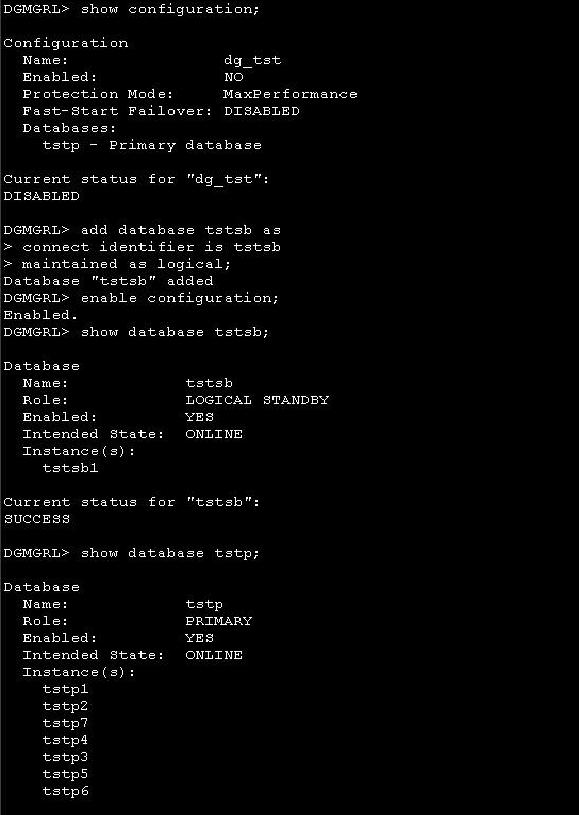
Make
Sure that the Standby Database is open and Apply Process Is running. Connect to
the DGMGRL as sys to Create configuration:
DGMGRL> connect sys
Password:
Connected.
DGMGRL>
DGMGRL> create configuration dg_tst as
> primary database is tstp
> connect identifier is tstp;
Configuration "dg_tst" created with primary database "tstp"
Add
the Logical Standby Database to the Configuration:
DGMGRL>
DGMGRL> add database tstsb as
> connect identifier is tstsb
> maintained as logical;
Database "tstsb" added
DGMGRL> exit;
Stop
and restart the database in open state:
srvctl modify database
-d tstp -s open -r primary -o /u13/app/oracle/product/10g
srvctl stop database -d tstp
srvctl start database -d tstp <-- open state
srvctl modify database -d tstp -s mount -r primary -o /u13/app/oracle/product/10g
Enable Configuration:
DGMGRL>
enable configuration;
Enabled.
DGMGRL> show database tstsb;
Database
Name:
tstsb
Role:
LOGICAL STANDBY
Enabled: YES
Intended State: ONLINE
Instance(s):
tstsb1
Current status for "tstsb":
SUCCESS
DGMGRL> show database tstp;
Database
Name:
tstp
Role:
PRIMARY
Enabled: YES
Intended State: ONLINE
Instance(s):
tstp1
tstp2
tstp7
tstp4
tstp3
tstp5
tstp6
Current status for "tstp":
SUCCESS
DGMGRL> show configuration;
Configuration
Name:
dg_tst
Enabled:
YES
Protection Mode: MaxPerformance
Fast-Start Failover: DISABLED
Databases:
tstp - Primary database
tstsb - Logical standby database
Current status for "dg_tst":
SUCCESS
DGMGRL> exit
Perform the Switch Over to the TSTSB Logical Standby
RAC DB:
Make
Sure that all of the below checks are 'SUCCESS' before issuing SWITCHOVER. Run
the below command for all the instances in RAC. If the output for all the
databases and Instances from the below commands are successful, THEN AND ONLY
THEN we are ready to switchover. These commands can be executed from either
sites.
show database verbose tstsb;
show instance verbose tstsb1 on database tstsb;
show database verbose tstp;
show instance verbose tstp1 on database tstp;
show instance verbose tstp2 on database tstp;
show instance verbose tstp3 on database tstp;
show instance verbose tstp4 on database tstp;
show instance verbose tstp5 on database tstp;
show instance verbose tstp6 on database tstp;
show instance verbose tstp7 on database tstp;
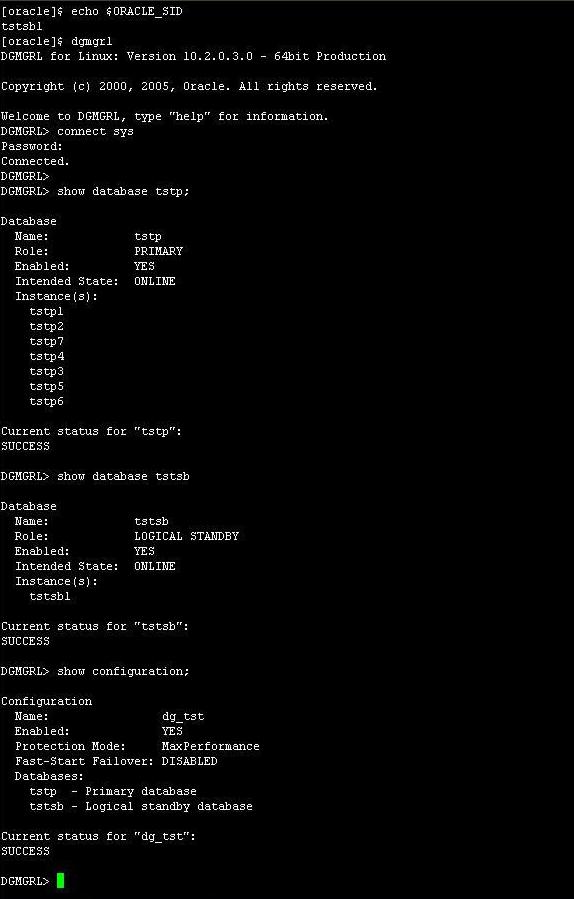
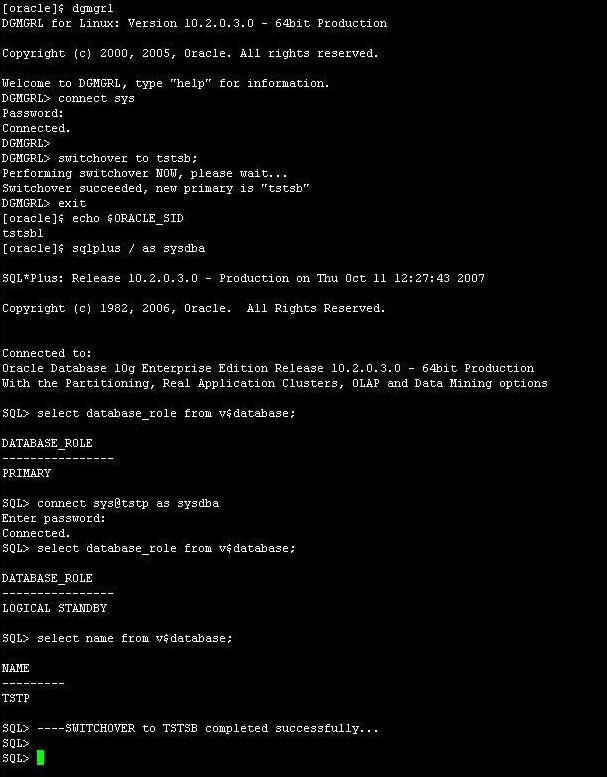
DGMGRL> switchover to tstsb;
Performing switchover NOW, please wait...
Switchover succeeded, new primary is "tstsb"
DGMGRL>
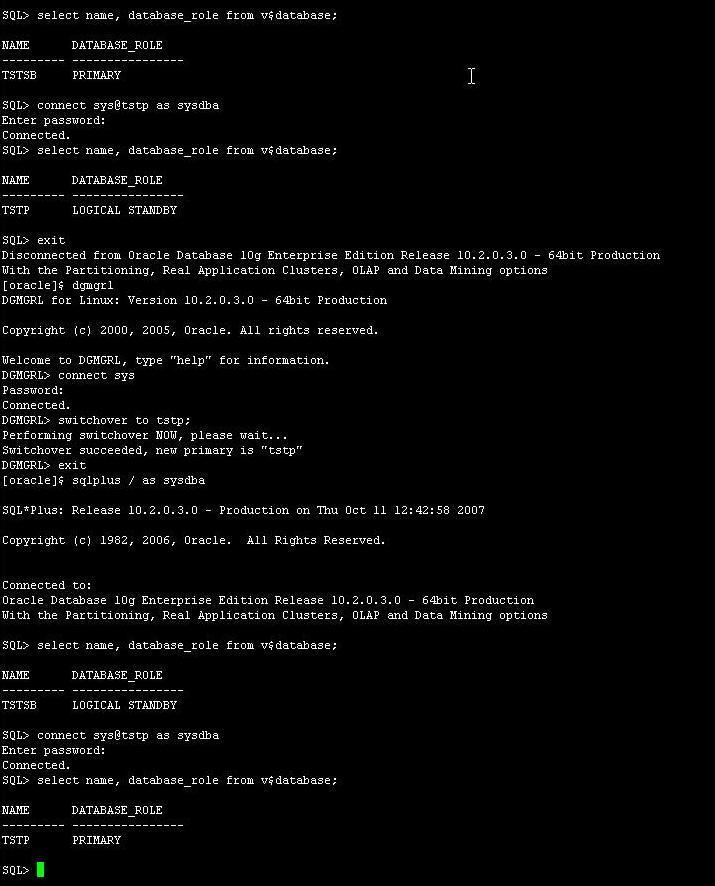
Perform Switchback to the Original Primary RAC DB
(TSTP):
DGMGRL>
switchover to tstp;
Performing switchover NOW, please wait...
Switchover succeeded, new primary is "tstp"
DGMGRL>
The
Step By Step configuration of Single Instance 10g Standby for single Instance
10g Primary is located HERE.