|
Step By Step
Instructions on Installing Oracle 11g Clusterware Software
(11.1.0.6) 32-bit on
CentOS
EL 4 Update 5 x86
By Bhavin Hingu
|
This
document explains the step by step process of installing Oracle 11g R1
(11.1.0.6) Clusterware Software.
Installing
Oracle11g
(11.1.0.6) Clusterware Software:
Task
List:
Setting
Up Oracle Environment:
Add the below lines
into the
.bash_profile under the oracle home
directory to set the CRS_HOME in the session.
export CRS_HOME=/u01/app/crs
Running OUI
(Oracle Universal
Installer) to install Oracle Clusterware:
Complete the
following
steps to install
Oracle Clusterware on your
cluster.
You
need to run the
runInstaller from ONLY ONE node (any single node in the cluster).
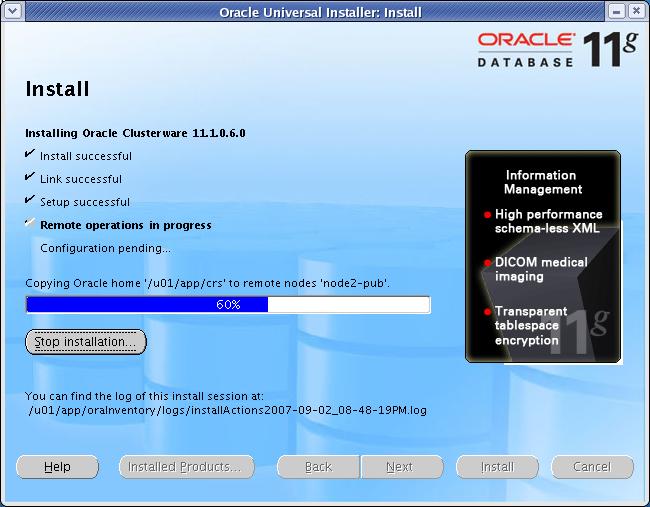
Start the runInstaller
command as oracle user from
any one node When OUI displays the Welcome page, click Next
Xlib:
connection to ":0.0" refused by server
Xlib: No protocol specified
Can't connect to X11 window server
using
':0.0' as the value of the DISPLAY variable.
If you get the
above
error,
please execute the below command as
root and then start the runInstaller by connecting as oracle.
[root@node1-pub
~]# xhost +
access control disabled, clients can
connect from any host
[root@node1-pub
~]# su -
oracle
[oracle@node1-pub ~]$
/mnt/cdrom/runInstaller

CLICK Next
At the below
step, the Oracle Cluster Verification Utility gets failed
becuase CentOS is not a certified
Linux OS for
the 11g RAC installation. Simply Ignore this error and continue.

CLICK Exit

Verifying CRS status:
The below
commands can be used to
verify the CRS status.
crsctl
check crs <<-- for the
local node
crsctl
check cluster <<-- for
remote nodes in the cluster
[root@node1-pub
~]# crsctl check crs
Cluster
Synchronization Services appears healthy
Cluster
Ready Services appears healthy
Event
Manager appears healthy
[root@node1-pub
~]#
crsctl
check cluster <<-- for
remote nodes in the cluster
For
this command to run, CSS needs to be running on the local node.
The
"ONLINE" status for remote node says that CSS is running on that node.
When
CSS is down on the remote node, the status of "OFFLINE" is displayed
for that node.
[root@node1-pub
~]# crsctl check cluster
node1-pub
ONLINE
node2-pub
ONLINE
Verifying Nodeapps Status:
Now,
verify
that the nodeapps are configured and running by executing the below
command.
[oracle@node2-pub
dbs]$ crs_stat -t
Name Type Target
State Host
------------------------------------------------------------
ora....pub.gsd
application ONLINE ONLINE
node1-pub
ora....pub.ons
application ONLINE ONLINE
node1-pub
ora....pub.vip
application ONLINE ONLINE
node1-pub
ora....pub.gsd
application ONLINE ONLINE
node2-pub
ora....pub.ons
application ONLINE ONLINE
node2-pub
ora....pub.vip
application ONLINE ONLINE
node2-pub
I
can also get the same info using
below series of command.
srvctl
config nodeapps -n node1-pub
srvctl
config nodeapps -n node2-pub
srvctl
status nodeapps -n node1-pub
srvctl
status nodeapps -n node2-pub
[root@node1-pub
~]# srvctl config nodeapps -n
node1-pub
VIP
exists.: /node1-vip/216.160.37.153/255.255.255.248/eth0
GSD
exists.
ONS
daemon exists.
Listener
exists.
[root@node1-pub
~]# srvctl config nodeapps -n
node2-pub
VIP
exists.: /node2-vip/216.160.37.157/255.255.255.248/eth0
GSD
exists.
ONS
daemon exists.
Listener
exists.
[root@node1-pub
~]# srvctl status nodeapps -n
node2-pub
VIP
is
running on node: node2-pub
GSD
is
running on node: node2-pub
Listener
is running on node: node2-pub
ONS
daemon is running on node: node2-pub
[root@node1-pub
~]# srvctl status nodeapps -n
node1-pub
VIP
is
running on node: node1-pub
GSD
is
running on node: node1-pub
Listener
is running on node: node1-pub
ONS
daemon is running on node: node1-pub
[root@node1-pub
~]#
REFERENCES:
Oracle
Documents